

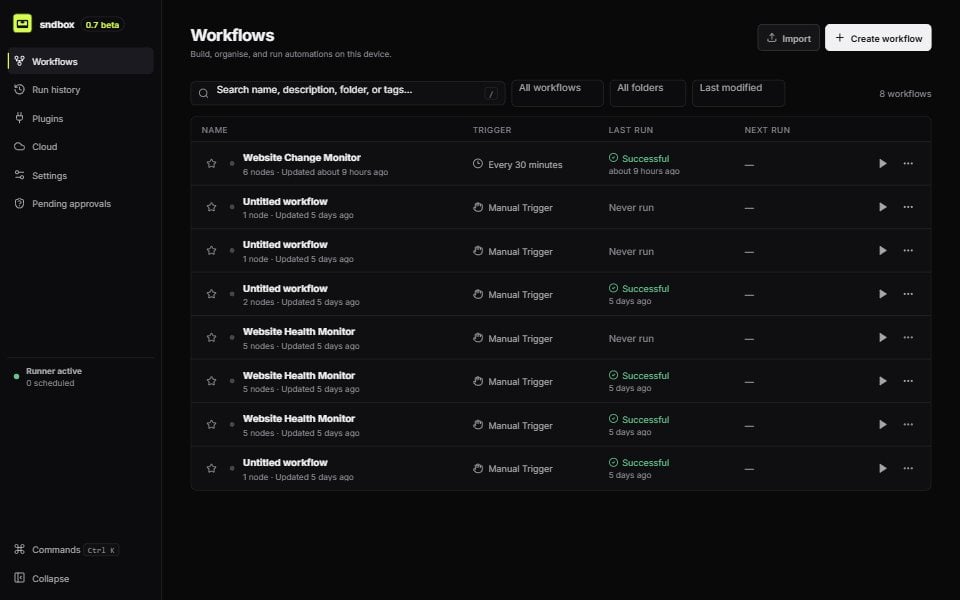
The real Workflows view in sndbox 0.7 beta
Create your first workflow
Install sndbox, connect real nodes, and inspect your first successful run.
Browse every built-in node
See the exact settings, ports, defaults, and permissions for each implemented node.
Build workflows with AI
Draft graphs, await model responses during runs, and write complete code blocks.
Create localhost sites
Combine checked HTML, JavaScript, and CSS Code nodes with Web Builder.
One workflow, visible end to end
The editor keeps the automation and its execution history together. Configure a node on the canvas, map data from earlier steps, test it, then open the run inspector to see what happened.1
Choose a real trigger
Start manually, on a schedule, when a file changes, or when matching Gmail messages arrive.
2
Connect the work
Add AI, Code, Web Builder, browser, HTTP, file, data, notification, approval, or communication nodes. The editor only exposes settings the selected node implements.
3
Run with explicit permissions
sndbox shows file-system, network, command, browser, and secret boundaries before execution.
4
Inspect the evidence
Review node inputs and outputs, logs, retries, screenshots, downloads, and browser diagnostics from the execution inspector.
This documentation describes the current repository implementation. Generated node and API reference pages are sourced directly from the codebase so their field names and defaults stay accurate.